
What is Multi-Factor Authentication (MFA)? And How Does SecVSC MFA It Work?
5/9/2026, 9:49:26 AM
What is Multi-Factor Authentication (MFA) ?
Traditional authentication typically involves a user ID + password; this method is commonly referred to as static password authentication, or single-password authentication. This security method fails to address three major issues:
User IDs cannot verify a user’s true identity: Typically, a user ID consists of a fixed string of characters or an email address, which can easily be copied or guessed; furthermore, a fixed ID cannot confirm whether it represents the user’s true identity;
Fixed passwords are vulnerable to brute-force attacks: If the user ID is known, fixed passwords—especially weak ones—can easily be cracked by various hacking tools through brute-force attacks. Even complex passwords can be stolen through phishing attacks carried out by viruses and Trojans;
Complex passwords are easy to forget, and changing them regularly is a headache for users: Currently, many users set complex, long passwords on a regular basis to enhance security. However, complex and long passwords are difficult to remember and cumbersome to enter. Furthermore, changing passwords regularly only adds to the complexity of remembering them and increases the likelihood of forgetting them. As a result, many users simply stick with the same simple password for extended periods, which creates a risk of weak passwords.
In response to the user pain points and issues associated with traditional authentication methods, multi-factor authentication (MFA) has emerged as a solution. Multi-factor authentication (MFA) is a new type of authentication method that requires users to provide at least two or more authentication factors when accessing a device or system (application or data) to verify their identity before they can access the specified resources or obtain the corresponding access permissions.
Unlike traditional User ID + password authentication, MFA requires one or more additional authentication factors, thereby significantly enhancing security and reducing the likelihood of successful attacks by various malicious tools.
Why is Multi-Factor Authentication (MFA) Important?
With the ongoing advancements in computer CPU performance, the increasing computational power of various cloud servers, and the rapid development of AI tools, it is becoming easier for cybercriminals to exploit network resources and AI tools to carry out brute-force attacks and computational analysis. Traditional authentication methods (User ID + Password) are highly vulnerable to these modern brute-force attacks and AI tools. Furthermore, attack methods such as forging identity credentials and dynamically intercepting verification codes pose significant security threats and risks of compromise to current traditional username-and-password authentication systems or dynamic password verification mechanisms.
A key advantage of multi-factor authentication (MFA) is that, unlike traditional static authentication methods, it requires users to verify their identity using methods other than just a User ID + Password, such as PKI digital certificates to validate legitimate identity—thereby significantly enhancing the security of both individuals and organizations. By employing a comprehensive multi-factor authentication approach, organizations can significantly boost the resilience of their devices or systems against unauthorized attacks by cybercriminals, while also substantially increasing the difficulty and cost of such attacks.
What is SecVSC MFA?
SecVSC (Secure Virtual Smart Card) is a mobile security application developed by JUNKAI-TECH that enhances Windows 10/11 login security by enabling smartphones to act as virtual smart cards. It provides 2FA/MFA, Bluetooth-based authentication, and supports features like one-touch screen locking, unlocking, and computer shutdown.
Key details about SecVSC include:
• Functionality: It replaces traditional passwords with mobile-based authentication, supporting PKI digital credentials for secure access.
• Security Features: Offers one-touch login, automatic locking, and secure BitLocker access via mobile device.
• Connectivity: Uses Bluetooth Low Energy (BLE) and QR code scanning for pairing.
• Availability: Mobile App available on the Google Play Store and Apple App Store,PC components available on JUNKAI-TECH official website and Microsoft Store .
How Does SecVSC Multi-Factor Authentication (MFA) work?
SecVSC MFA works by using a smartphone as a secure carrier of the user’s identity information and employing PKI digital certificate technology to legitimately write valid user access credentials to the smartphone via the VSC-IssuingP certificate issuance tool on a computer (securely issued to the phone). Combined with the inherent security features of the smartphone (iPhone or Android phone), this transforms the smartphone into a security factor (virtual smart card) with PKI authentication capabilities. It is used for strong authentication during login to computer devices or systems. By leveraging the smartphone’s proximity sensing capabilities, it enables continuous and dynamic identity verification, thereby allowing the device or system to authenticate the user’s identity and access credentials and grant real-time authorization of identity permissions.
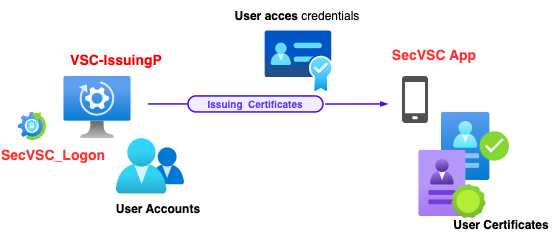
SecVSC MFA’s security features and innovative technology enable users to authenticate quickly and securely without passwords, effectively addressing the cumbersome process of entering passwords to log in to computer devices and the complexity of password management, while significantly enhancing the security of computer devices against various brute-force attacks and AI-powered attacks.
SecVSC MFA's mobile presence-based authentication mode provides fast and convenient strong authentication for password-less Windows logins. It effectively eliminates the hassle of remembering and managing complex passwords, as well as the security risks associated with weak passwords, while reducing the time spent on password verification and maintenance and improving authentication efficiency.
How does SecVSC MFA differ from other multi-factor authentication (MFA) tools on the market? What are the key features of SecVSC MFA?
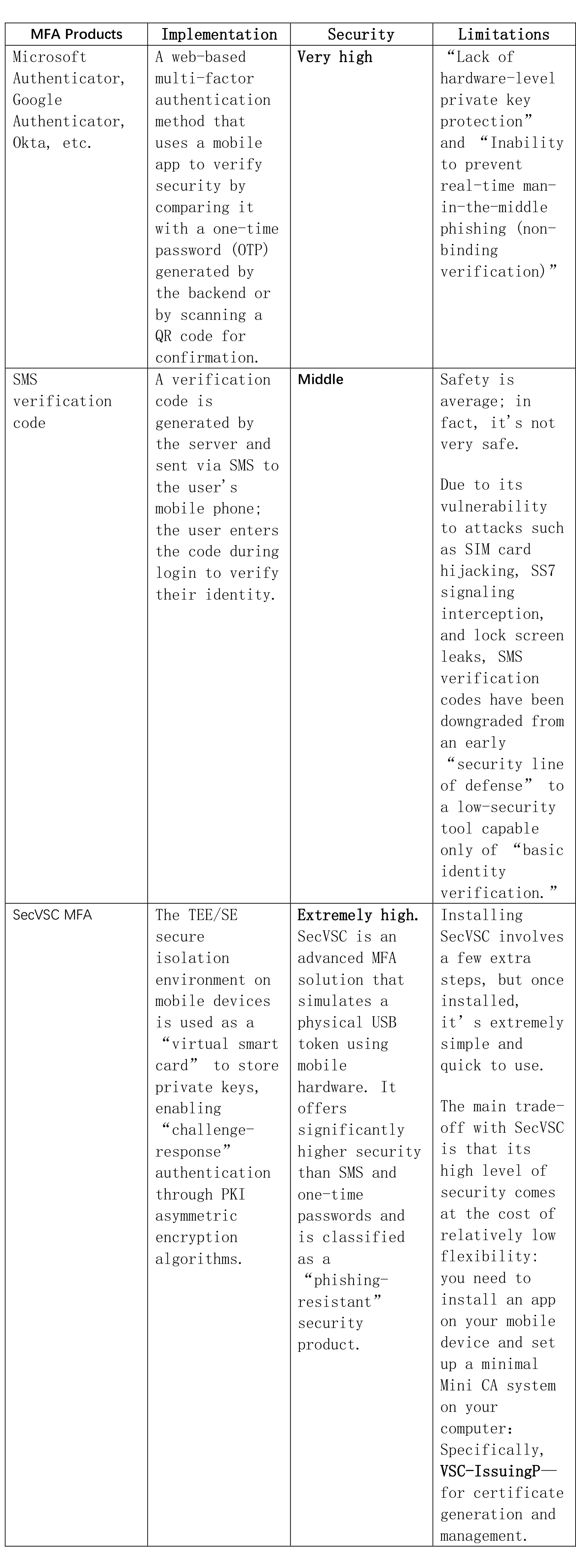
There are many types of multi-factor authentication (MFA) tools available on the market, such as Microsoft Authenticator, Google Authenticator, Okta, and others. In addition, there are various mobile OTA tools and SMS and email verification tools. These tools are highly effective at enhancing authentication in their respective domains. Below is a brief comparison of SecVSC MFA with these tools:
Where can download and learn more about SecVSC MFA?
If you’d like to learn more about SecVSC MFA, a Windows login MFA solution, visit its official website to learn more and download a trial version: